



Grammar
Tenses
Present

Present Simple
Present Continuous
Present Perfect
Present Perfect Continuous
Past
Past Simple
Past Continuous
Past Perfect
Past Perfect Continuous
Future
Future Simple
Future Continuous
Future Perfect
Future Perfect Continuous
Parts Of Speech
Nouns
Countable and uncountable nouns
Verbal nouns
Singular and Plural nouns
Proper nouns
Nouns gender
Nouns definition
Concrete nouns
Abstract nouns
Common nouns
Collective nouns
Definition Of Nouns
Animate and Inanimate nouns
Nouns
Verbs
Stative and dynamic verbs
Finite and nonfinite verbs
To be verbs
Transitive and intransitive verbs
Auxiliary verbs
Modal verbs
Regular and irregular verbs
Action verbs
Verbs
Adverbs
Relative adverbs
Interrogative adverbs
Adverbs of time
Adverbs of place
Adverbs of reason
Adverbs of quantity
Adverbs of manner
Adverbs of frequency
Adverbs of affirmation
Adverbs
Adjectives
Quantitative adjective
Proper adjective
Possessive adjective
Numeral adjective
Interrogative adjective
Distributive adjective
Descriptive adjective
Demonstrative adjective
Pronouns
Subject pronoun
Relative pronoun
Reflexive pronoun
Reciprocal pronoun
Possessive pronoun
Personal pronoun
Interrogative pronoun
Indefinite pronoun
Emphatic pronoun
Distributive pronoun
Demonstrative pronoun
Pronouns
Pre Position
Preposition by function
Time preposition
Reason preposition
Possession preposition
Place preposition
Phrases preposition
Origin preposition
Measure preposition
Direction preposition
Contrast preposition
Agent preposition
Preposition by construction
Simple preposition
Phrase preposition
Double preposition
Compound preposition
prepositions
Conjunctions
Subordinating conjunction
Correlative conjunction
Coordinating conjunction
Conjunctive adverbs
conjunctions
Interjections
Express calling interjection
Phrases
Sentences
Clauses
Part of Speech
Grammar Rules
Passive and Active
Preference
Requests and offers
wishes
Be used to
Some and any
Could have done
Describing people
Giving advices
Possession
Comparative and superlative
Giving Reason
Making Suggestions
Apologizing
Forming questions
Since and for
Directions
Obligation
Adverbials
invitation
Articles
Imaginary condition
Zero conditional
First conditional
Second conditional
Third conditional
Reported speech
Demonstratives
Determiners
Direct and Indirect speech
Linguistics
Phonetics
Phonology
Linguistics fields
Syntax
Morphology
Semantics
pragmatics
History
Writing
Grammar
Phonetics and Phonology
Semiotics
Reading Comprehension
Elementary
Intermediate
Advanced
Teaching Methods
Teaching Strategies
Assessment

Learning Agreement web-form
 المؤلف:
Stephen Gomez & David Lush
المؤلف:
Stephen Gomez & David Lush
 المصدر:
Enhancing Teaching and Learning through Assessment
المصدر:
Enhancing Teaching and Learning through Assessment
 الجزء والصفحة:
P332-C28
الجزء والصفحة:
P332-C28
 2025-07-31
 514
514




+
-
20
Learning Agreement web-form
The Learning Agreement (LA) web-form allows the student to show his/her learning during the placement period. The activities during placement are described in terms of tasks, with each task representing a learning opportunity. For science students, typical tasks may involve: learning a particular laboratory technique or procedure; data analysis or synthesis; formal presentations; report writing. The LA web-form consists of several sections which, in the diagrams below, are separated for ease of explanation. The following screenshots are of low resolution but the forms are available on request for you to view in more detail.
i. Identification fields
The LA web-form, like all other forms used to monitor placement learning, starts with student identification fields where the student enters his/her name and unique university student number (below).

ii. List of tasks
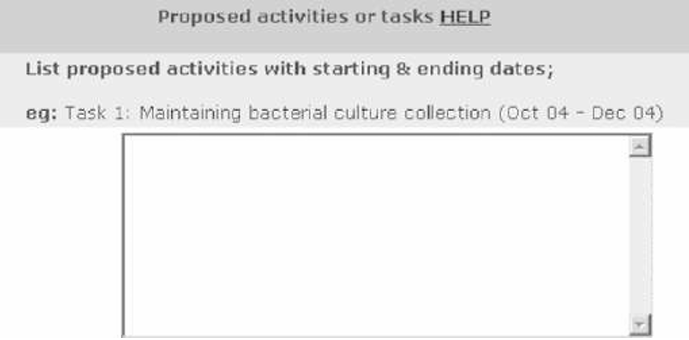
The next field on the web-form is a text-area into which the student enters the list of tasks they are hoping to perform on placement. The number and type of tasks are first negotiated with the work supervisor and agreed with the tutor. Each student lists between 5 and 10 tasks.
iii. Task deadlines
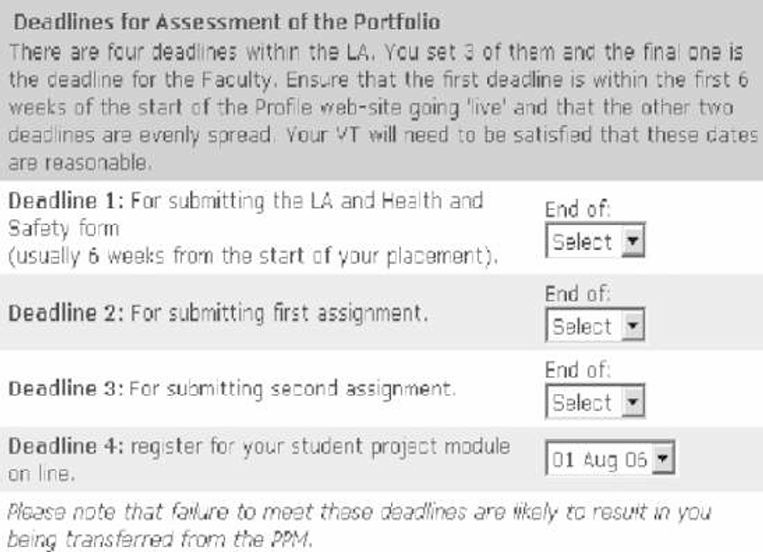
Four deadlines are set for the completion of the portfolio material. The final deadline is determined by us as all portfolios needed to be completed by 1 September for administrative purposes. The other deadlines are set by the student and agreed by the work supervisor and VT; these can vary according to the individual working practices of the placement but are spaced to ensure that the student works steadily on the portfolio rather than completing all the sections towards the end of the placement period.
iv. Sign off
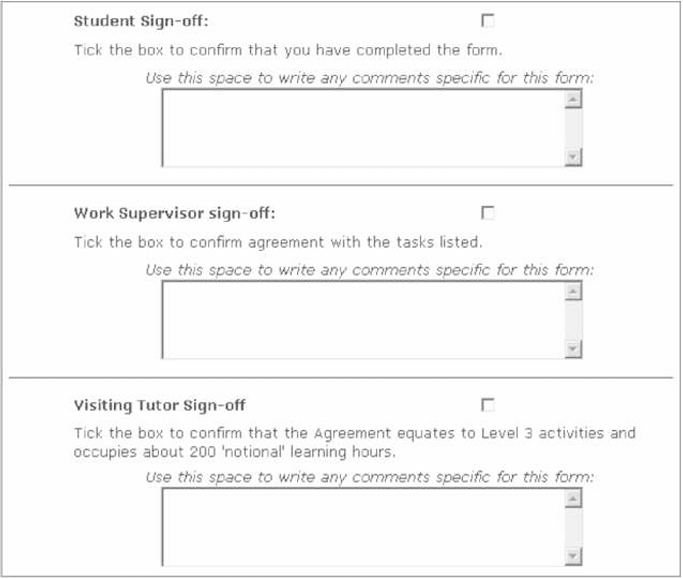
The final section of the LA web-form contains three similar sub-sections, one each for the student, work supervisor and VT. The student ticks a checkbox as a 'sign off' that the form is complete and ready for assessment. A text area is also provided for any comments the student wishes to make. A similar section is provided for the work supervisor to sign off to confirm agreement with the LA; again, a box is provided for any comments. A third sign off area is for the VT to confirm agreement with the LA and that the task meets academic requirements. When all three sign-off checkboxes are selected, the form is locked so that the student cannot go back and make changes.
v. Submit button
At the bottom of the web-form is a Submit button which saves any valid changes made to the form when clicked.
 الاكثر قراءة في Teaching Strategies
 اخر الاخبار
اخبار العتبة العباسية المقدسة

الآخبار الصحية


مواضيع ذات صلة
 قسم الشؤون الفكرية يصدر كتاباً يوثق تاريخ السدانة في العتبة العباسية المقدسة
 "المهمة".. إصدار قصصي يوثّق القصص الفائزة في مسابقة فتوى الدفاع المقدسة للقصة القصيرة
 (نوافذ).. إصدار أدبي يوثق القصص الفائزة في مسابقة الإمام العسكري (عليه السلام)